
In the crowded landscape of AI-powered creative tools, Google’s Nano Banana has emerged not merely as another image generator, but as a surprisingly sophisticated and accessible editor that challenges the necessity of complex, standalone software for many common tasks. Functioning as Gemini’s specialized model for image editing and generation, Nano Banana provides a suite of powerful capabilities from seamless text integration and advanced image blending to intelligent object removal and contextual content addition that are remarkably available to free users, with enhanced features unlocked through a Pro subscription. After extensive, hands-on testing, it becomes clear that this tool represents a significant leap forward in democratizing professional-grade image manipulation, moving the power of AI from pure generation to intelligent, context-aware enhancement. These seven techniques demonstrate precisely why Nano Banana is becoming an indispensable tool for creators, marketers, and everyday users alike.
1. The Text Integration Breakthrough: From Photo to Infographic
A persistent weakness in most AI image models has been the reliable generation of legible text. Nano Banana, and particularly its Pro version, turns this weakness into a standout strength. The model can analyze a photograph and integrate clear, stylistically appropriate text directly into the scenewhether as labels on a product, captions on a social media graphic, or annotations on an educational diagram.
- How It Works & Use Cases: By providing a simple text prompt alongside an uploaded image (e.g., “Add a label that says ‘Organic Coffee’ on the bag”), Nano Banana generates text that respects the image’s perspective, lighting, and color palette. This is transformative for creating quick presentation slides, informational Instagram posts, or annotated product shots without needing to layer text manually in a separate design app. While very small font sizes or extremely high-resolution demands might reveal limitations, for most web and social media applications, the accuracy and coherence are impressive.
2. Advanced Image Blending: Creating Cohesive Composites from Chaos
Nano Banana demonstrates a sophisticated understanding of visual context in its blending capabilities. It can take objects or people from one image and place them convincingly into another, automatically adjusting for scale, lighting direction, color temperature, and even shadow casting.
- The Technical Prowess: During testing, blending a piece of modern furniture into a photo of a traditional living room resulted in the AI not only resizing the furniture appropriately but also subtly altering its wood tone to better match the room’s warmer lighting. The Pro version’s ability to handle up to fourteen image inputs simultaneously opens doors for complex artistic collages or detailed scene construction that would be prohibitively time-consuming manually. The standard version’s capability to blend 2-3 images remains powerfully effective for most common needs, like adding a missing family member to a group photo or placing a product in an aspirational setting.
3. Precision Object Removal & Intelligent Content Addition
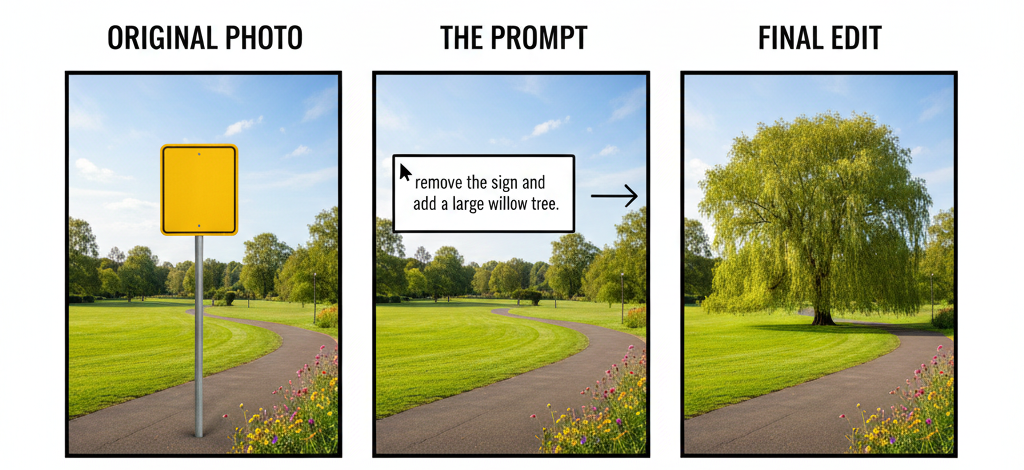
This two-sided capability showcases Nano Banana’s understanding of an image’s “complete scene.” The object removal tool is exceptionally good at deleting distractions a trash can on a beach, a passerby in a landmark photo, power lines in a landscape and then inpainting (generating) a believable background to fill the void, using the surrounding context as a guide.
- Conversely, the content addition feature allows for the expansion or enhancement of scenes. You can prompt it to “add cherry blossom trees along the path” or “put a cozy rug in the center of the room,” and it will generate new elements that plausibly belong, matching the style, texture, and lighting of the original photograph. The success rate is high for natural and common objects, though highly specific or unusual requests (e.g., “add a Victorian-era diving helmet on the table”) can produce more variable results.
4. Style Transfer and Artistic Reinterpretation
Beyond literal edits, Nano Banana can reinterpret the style of an uploaded image. By prompting it to transform a photograph “in the style of a watercolor painting,” “as a retro poster,” or “like a cyberpunk neon scene,” the AI applies coherent stylistic filters that go beyond simple color grading, often re-rendering textures and details to match the chosen aesthetic. This provides a quick path to creating branded visual content or exploring artistic directions without specialized software.
5. Context-Aware Image Expansion (Outpainting)
If a photo is cropped too tightly, Nano Banana can intelligently expand the canvas. By using the “expand” feature, the AI generates new, plausible content that continues the scene beyond its original borders extending a forest, sky, or architectural detail. This is invaluable for changing aspect ratios for different social media platforms or salvaging a poorly framed shot.
6. Resolution Enhancement and Detail Recovery
While not a dedicated upscaler, Nano Banana’s generative capabilities can be directed to improve low-resolution or blurry images. By prompting it to “enhance details” or “increase resolution,” the model can often sharpen edges, recover texture, and add plausible detail in a way that traditional upscaling algorithms cannot, making older or low-quality photos more usable.
7. Batch Processing and Workflow Integration (Pro Feature)
For power users, the Pro subscription unlocks more systematic utility, including the potential for batch processing of images with similar edits and deeper integration prompts. This begins to move the tool from a playful experiment into a repeatable part of a content creation workflow, especially for tasks like branding multiple product images or preparing a series of social media posts with consistent stylistic edits.
Strategic Evaluation: When to Choose Nano Banana Over Traditional Software
Nano Banana is not a replacement for Adobe Photoshop in a professional print design workflow. However, it dramatically lowers the barrier to achieving complex edits for digital content.
| Ideal Use Cases for Nano Banana | Limitations and Considerations |
|---|---|
| Rapid Social Media & Marketing Content: Creating polished graphics, removing backgrounds, adding text. Photo Restoration & Enhancement: Removing objects, improving old photos, expanding cropped images. Creative Brainstorming & Mockups: Quickly visualizing concepts (e.g., “how would this product look in a modern kitchen?”). Educational & Presentation Material: Easily turning photos into annotated diagrams or infographics. | Pixel-Perfect Precision: Lacks the layer-based, non-destructive, and exact control of professional design software. Consistency at Scale: Results can vary slightly between similar edits; not yet a fully predictable production pipeline tool. Very Specific or Unusual Requests: May struggle with highly niche or abstract concepts outside its training data. Output Resolution: While good, maximum output resolution may not meet all professional print standards. |
The New Creative Paradigm
Google’s Nano Banana ultimately signifies a shift in creative tools from complex instruction sets (mastering software interfaces) to intuitive intention expression (describing what you want). By mastering these seven techniques from its unparalleled text handling to its intelligent blending and context-aware edits users can accomplish in seconds what once required significant technical skill. It democratizes not just image creation, but sophisticated image manipulation, placing a formidable creative ally directly within a conversation with an AI. For the vast majority of digital image needs, the future of editing is no longer in a standalone application it’s in a prompt.
Explore Steaktek for more updates.

